




 Zoho
Zoho





 Odoo
Odoo












 Mailing


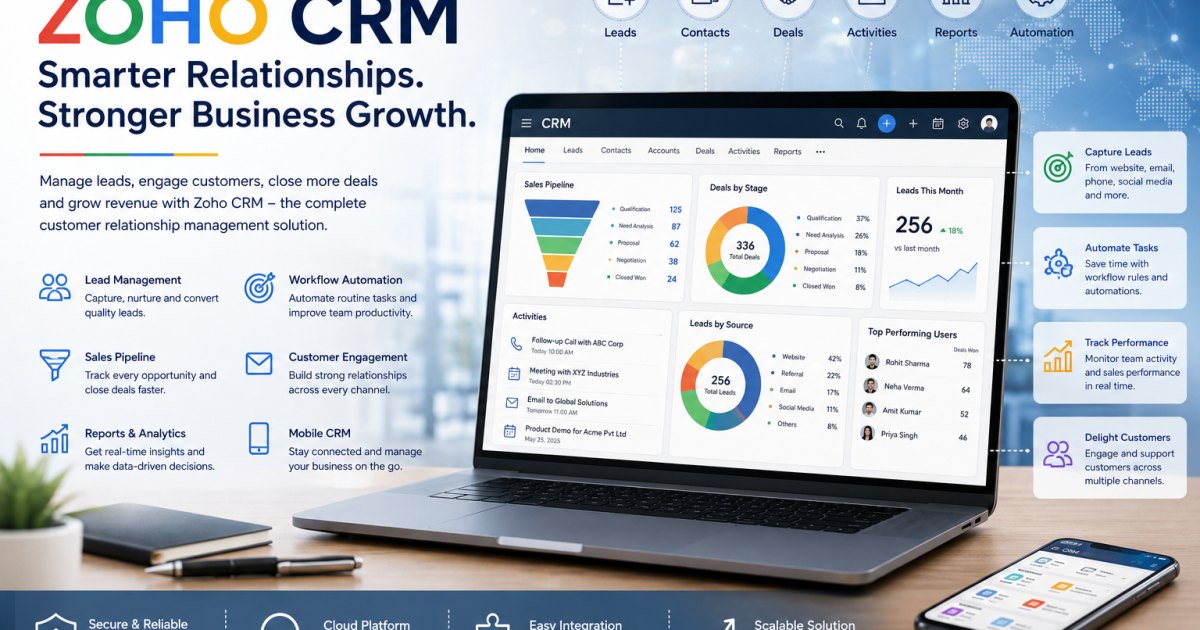
Zoho CRM / 22 min read / July 01, 2026 11:21 AM IST
Zoho CRM Services by Tekvista Infosolutions Pvt Ltd: Smarter Sales, Better Customer Management, and Scalable Business Growth
IntroductionIn every growing business, customer relationships are the foundation of revenue, service quality, and long-term success. Whether a company sells products, provides services, manages dealer networks, handles corporate enquiries, or runs a sales team, it needs a structured system to manage...

By Chaitanya Chaturvedi · @chaitanya
Business Application Developer · BUSINESS
Developer by profession, builder by passion. At Agile Innotech, I create powerful web applications and digital platforms—from ecommerce systems to content-driven products. Always exploring smarter, faster ways to build for the web.
Introduction
In every growing business, customer relationships are the foundation of revenue, service quality, and long-term success. Whether a company sells products, provides services, manages dealer networks, handles corporate enquiries, or runs a sales team, it needs a structured system to manage leads, follow-ups, quotations, deals, customers, and performance.
Many businesses still depend on spreadsheets, WhatsApp chats, notebooks, scattered emails, and memory-based follow-ups. This may work in the early stage, but as the number of leads and customers grows, manual tracking becomes risky. Sales opportunities are missed, follow-ups are delayed, customer history gets lost, and management has no clear visibility into what the sales team is doing.
This is where Zoho CRM becomes a powerful solution.
Tekvista Infosolutions Pvt Ltd helps businesses implement, configure, customize, automate, and support Zoho CRM so that sales, marketing, customer communication, and business follow-ups become more organised, measurable, and scalable. With experience across enterprise IT services, cloud, cybersecurity, business applications, mailing solutions, Zoho, Odoo, software solutions, and managed support, Tekvista delivers Zoho CRM services with a practical business-first approach.
Zoho CRM is not just a contact database. It is a complete customer relationship management platform that helps businesses manage leads, accounts, contacts, deals, activities, follow-ups, reports, dashboards, automation, customer communication, sales forecasting, and team productivity from one central system.
For businesses that want to move from scattered sales tracking to a professional CRM workflow, Tekvista provides end-to-end Zoho CRM implementation and support.
What is Zoho CRM?
Zoho CRM is a cloud-based customer relationship management platform that helps businesses manage their complete sales and customer lifecycle. It allows teams to capture leads, track enquiries, manage customer information, monitor sales opportunities, schedule follow-ups, automate routine tasks, generate insights, and improve sales performance.
A CRM system helps businesses answer important questions such as:
How many leads came this month?
Which salesperson is handling which enquiry?
Which leads are pending follow-up?
Which deals are likely to close?
Which customers have not been contacted recently?
How many quotations are under discussion?
Which industries or sources are generating the best leads?
What is the value of the current sales pipeline?
What is the expected revenue for the coming month?
Which stage is causing sales delay?
Which team member needs support?
Without a CRM, these answers are usually scattered across mobile phones, notebooks, emails, Excel files, and informal conversations. With Zoho CRM, the business gets a centralised platform for customer data, sales process management, and decision-making.
Why Businesses Need Zoho CRM
A business does not need CRM only after becoming large. In fact, CRM becomes useful as soon as the business starts receiving regular enquiries and needs proper follow-up discipline.
Zoho CRM is useful for:
Small businesses
Trading companies
Manufacturing companies
IT service providers
Consultants
Real estate firms
Education institutions
Healthcare service providers
Finance and professional service firms
Distributors and dealers
B2B sales teams
Service-based companies
Startups
Growing enterprises
Common problems that Zoho CRM can solve include:
Leads are not properly recorded
Follow-ups are forgotten
Sales team work is not visible to management
Customer data is stored in multiple places
Quotations and deal discussions are not tracked
Old customers are not nurtured
Sales reports are manually prepared
Calls and meetings are not documented
Lead source performance is unknown
There is no clear sales pipeline
Management depends only on verbal updates
Employees leaving the company take customer knowledge with them
Zoho CRM helps bring structure, discipline, automation, and transparency to customer-facing operations.
Tekvista Infosolutions Pvt Ltd: Zoho CRM Services for Modern Businesses
Tekvista Infosolutions Pvt Ltd provides technology services for businesses that want reliable digital systems, secure infrastructure, and practical business applications. Tekvista’s service ecosystem includes IT consultancy, cybersecurity, cloud solutions, IT support, software solutions, networking, mailing solutions, systems infrastructure, AI integration, Zoho, Odoo, and enterprise technology support.
Zoho CRM fits naturally into this ecosystem because CRM is not only a sales tool. It often connects with email, websites, forms, marketing campaigns, accounting, helpdesk, inventory, workflow automation, analytics, and business communication.
Tekvista helps businesses implement Zoho CRM in a way that matches their real operations. Instead of simply creating a few users and modules, Tekvista focuses on understanding how the business actually works:
How leads are received
How enquiries are assigned
How follow-ups happen
How quotations are created
How deals are tracked
How management reviews performance
How customer information is stored
How departments coordinate
How sales and service teams communicate
How reporting is required
How automation can reduce manual work
This practical understanding helps Tekvista design a CRM system that is useful for daily work, not just impressive on paper.
Core Zoho CRM Services Provided by Tekvista
1. Zoho CRM Consultation and Requirement Analysis
A successful CRM implementation starts with proper requirement analysis. Every business has a different sales process. A manufacturing company may track dealer enquiries, product categories, quotations, dispatch coordination, and payment follow-ups. A service company may track consultations, proposals, meetings, projects, and renewals. A trading company may focus on lead source, product demand, price negotiation, quotation follow-up, and repeat orders.
Tekvista helps businesses identify:
Current sales process
Lead sources
Sales team structure
Customer categories
Deal stages
Follow-up rules
Quotation requirements
Reporting expectations
Automation opportunities
Integration needs
User roles and permissions
Management dashboard requirements
The goal is to avoid a generic CRM setup and create a system that matches the actual business workflow.
2. Zoho CRM Account Setup and Configuration
Tekvista helps configure Zoho CRM from the beginning so the business gets a clean and structured system.
This may include:
Zoho CRM organisation setup
User creation
Role and profile configuration
Department-wise access
Module configuration
Field setup
Custom views
Lead stages
Deal stages
Sales pipeline setup
Territory setup, where required
Currency and business settings
Email configuration
Basic security settings
A clean setup is important because poor CRM configuration creates confusion later. Tekvista ensures that the foundation is organised before the system is rolled out to the team.
3. Lead Management Setup
Lead management is one of the most important functions of Zoho CRM. Every business receives enquiries from different sources, such as:
Website forms
Phone calls
Social media
Google Ads
Referrals
Walk-in customers
Trade shows
Existing customers
Channel partners
Sales visits
Market research
Tekvista helps configure Zoho CRM so leads can be captured, categorised, assigned, and followed up properly.
Lead fields may include:
Lead name
Company name
Phone number
Location
Industry
Requirement
Product or service interest
Lead source
Lead status
Assigned salesperson
Follow-up date
Expected value
Remarks
Priority
Next action
With proper lead management, the business can reduce missed opportunities and improve follow-up discipline.
4. Sales Pipeline and Deal Management
A sales pipeline shows where each opportunity stands in the sales process. This helps the sales team and management understand how close each deal is to closure.
Tekvista can help configure deal stages such as:
New enquiry
Contacted
Requirement discussed
Product or service proposed
Quotation sent
Negotiation
Follow-up pending
Verbal confirmation
Won
Lost
On hold
The stages can be customised depending on the company’s business model.
For example, a B2B IT service company may use stages such as:
Lead qualified
Technical discussion
Site visit scheduled
Proposal shared
Commercial negotiation
Purchase order awaited
Closed won
Closed lost
A manufacturing or trading business may use stages such as:
Product requirement received
Price discussion
Sample requested
Quotation sent
Payment terms discussion
Order confirmation awaited
Order received
With a well-designed pipeline, management can track expected revenue, deal ageing, salesperson performance, and bottlenecks in the sales cycle.
5. Accounts and Contact Management
Customer data is one of the most valuable assets of a business. Zoho CRM helps organise company accounts and individual contacts in a structured manner.
Tekvista helps configure account and contact management for:
Customer companies
Individual contacts
Dealers
Vendors
Channel partners
Decision-makers
Purchase managers
Finance contacts
Technical contacts
Existing customers
Prospects
Repeat customers
Important fields may include:
Company name
GST details, where applicable
Industry
Address
Website
Phone
Contact persons
Designation
Customer type
Product interest
Account owner
Relationship status
Notes and history
This creates a central customer database that remains with the company even when employees change.
6. Custom Module and Field Customization
Every business has unique information that may not fit perfectly into standard CRM fields. Tekvista can customise Zoho CRM modules and fields according to the business requirement.
Custom fields can be created for:
Product category
Service type
AMC status
Warranty date
Renewal date
Installation date
Quotation reference
Dealer code
Territory
Payment terms
Lead priority
Customer segment
Site visit date
Product serial number
Industry type
Business vertical
Follow-up remarks
Custom modules may be useful for:
AMC tracking
Installation tracking
Service requests
Dealer management
Partner management
Product demonstrations
Site visits
Renewal management
Project enquiries
Sample requests
Vendor coordination
Customisation helps the CRM become more relevant to the company’s actual operations.
7. Workflow Automation
Manual follow-up is one of the biggest reasons sales teams lose opportunities. Zoho CRM automation can help reduce repetitive work and improve consistency.
Tekvista can configure workflow automation for:
Lead assignment
Follow-up reminders
Email notifications
Deal stage alerts
Task creation
Escalation rules
Customer update reminders
Renewal reminders
AMC expiry alerts
Quotation follow-up alerts
Lead ageing alerts
Sales manager notifications
Welcome email triggers
Internal approval notifications
For example:
When a new website enquiry is received, Zoho CRM can automatically create a lead and assign it to a salesperson.
If a lead is not contacted within a defined time, the manager can receive an alert.
When a quotation is marked as sent, a follow-up task can be created automatically.
When an AMC renewal date is approaching, the account owner can receive a reminder.
When a deal value is high, approval can be required before discount confirmation.
Automation helps businesses improve speed, discipline, and accountability.
8. Blueprint and Process Control
Zoho CRM Blueprint helps businesses enforce a defined process. Instead of allowing users to move records randomly, Blueprint can guide users through the correct steps.
Tekvista can help create process flows such as:
Lead qualification process
Deal approval process
Quotation follow-up process
AMC renewal process
Service onboarding process
Customer conversion process
Complaint escalation process
Sales visit process
For example, a lead may not move to “Qualified” unless the salesperson fills in required fields such as requirement, budget, location, expected timeline, and decision-maker information.
This ensures that important information is captured before the record moves forward.
9. Email Integration and Communication Tracking
Sales conversations often happen over email. If emails remain only inside individual inboxes, management loses visibility and customer history becomes incomplete.
Tekvista can help integrate email with Zoho CRM so communication can be associated with leads, contacts, accounts, and deals.
Benefits include:
Better customer communication history
Easier follow-up tracking
Reduced dependency on individual inboxes
Better visibility for team members
More professional sales communication
Improved record keeping
Email templates can also be configured for:
Introduction emails
Follow-up emails
Quotation follow-ups
Meeting confirmations
Product information
Service reminders
Thank-you emails
Renewal reminders
This helps the sales team communicate faster and more consistently.
10. Website Form and Lead Capture Integration
A company website can become a strong lead-generation channel when connected properly to CRM.
Tekvista can help integrate website forms with Zoho CRM so enquiries are automatically captured as leads. This reduces manual entry and ensures faster response.
Website form integration can be used for:
Contact forms
Service enquiry forms
Product enquiry forms
Demo request forms
Support request forms
Consultation forms
Download forms
Event registration forms
When someone submits a form, the CRM can capture the data, assign it to the right person, create a follow-up task, and send internal notifications.
This is especially useful for businesses running SEO campaigns, Google Ads, social media campaigns, or landing pages.
11. Zoho CRM Integration with Other Zoho Apps
Zoho CRM becomes more powerful when connected with other Zoho applications. Tekvista can help businesses plan and implement Zoho ecosystem integrations based on their needs.
Useful Zoho integrations may include:
Zoho Books for accounting and invoices
Zoho Inventory for stock and order management
Zoho Desk for customer support
Zoho Campaigns for email marketing
Zoho Forms for data collection
Zoho Flow for workflow automation
Zoho Analytics for advanced reporting
Zoho Projects for project execution
Zoho Sign for digital signatures
Zoho Mail for business email
Zoho People for HR operations
Zoho Creator for custom applications
Zoho Cliq for team communication
For example, a business can use Zoho CRM for sales, Zoho Books for billing, Zoho Desk for support, and Zoho Campaigns for customer communication. Tekvista helps decide which apps are actually needed so the business does not overcomplicate the system.
12. Zoho CRM and Third-Party Integrations
Many businesses already use different tools for websites, emails, accounting, marketing, telephony, WhatsApp communication, or internal operations. Tekvista can help plan CRM integrations based on practical business requirements.
Possible integration areas include:
Website forms
Business email
Google Workspace
Microsoft 365
WhatsApp communication tools
Telephony systems
Accounting platforms
ERP systems
Payment gateways
Landing pages
Marketing tools
Custom software applications
Reporting systems
Integration helps reduce duplicate data entry and creates a more connected business workflow.
13. Reports and Dashboards
One of the biggest advantages of Zoho CRM is visibility. Management can view sales activity, lead status, pipeline value, team performance, and customer follow-up data through reports and dashboards.
Tekvista can configure reports such as:
Leads generated this month
Leads by source
Leads by salesperson
Pending follow-ups
Overdue tasks
Deals by stage
Deals closing this month
Sales pipeline value
Won deals
Lost deals
Deal ageing report
Conversion rate
Industry-wise opportunities
Product-wise enquiries
Customer segment report
Activity report
Call and meeting report
Dashboards can be created for:
Business owner
Sales manager
Individual salesperson
Marketing team
Support team
Operations team
A properly configured dashboard reduces dependency on manual reporting and gives management better control over sales operations.
14. Data Migration to Zoho CRM
Many businesses already maintain customer and lead data in Excel, Google Sheets, Outlook contacts, email systems, old CRM tools, accounting software, or other databases. Tekvista can help clean and migrate this data into Zoho CRM.
Data migration may include:
Lead data
Customer data
Contact persons
Company accounts
Deal records
Product lists
Salesperson assignments
Historical notes
Follow-up dates
Custom field data
Before migration, data often needs cleaning. Duplicate records, incomplete details, old contacts, wrong formatting, and inconsistent naming can create problems if imported directly.
Tekvista helps structure the migration process so the CRM starts with cleaner and more usable data.
15. User Roles, Permissions, and Security
A CRM contains sensitive customer and business information. Not every user should have access to every record or setting. Tekvista helps configure roles and permissions according to company structure.
Access can be planned for:
Business owners
Directors
Sales managers
Sales executives
Support users
Marketing users
Admin users
Finance users
Department heads
Permissions can control:
Who can view records
Who can edit records
Who can delete records
Who can export data
Who can view reports
Who can change settings
Who can access sensitive fields
This helps protect business data and supports better internal control.
16. Zoho CRM Training and User Adoption
CRM success depends heavily on user adoption. If the sales team does not use the CRM properly, the system will not provide accurate reports or business value.
Tekvista can provide training for:
CRM navigation
Lead creation
Follow-up management
Deal updating
Account and contact management
Task and activity usage
Email templates
Notes and attachments
Reports and dashboards
Mobile CRM usage
Sales pipeline discipline
Data quality practices
Training helps users understand not only how to use Zoho CRM, but why it matters for business growth.
17. Ongoing Zoho CRM Support
After CRM implementation, businesses often need support for changes, improvements, troubleshooting, new users, new automation, reports, and integrations.
Tekvista can provide ongoing support for:
User creation and removal
Password and access issues
Module updates
Field changes
Workflow changes
Report creation
Dashboard improvements
Data import assistance
Integration troubleshooting
Email configuration
Automation updates
Process improvements
User training refreshers
A CRM should evolve as the business grows. Tekvista helps ensure that Zoho CRM remains useful, updated, and aligned with changing business needs.
Zoho CRM for Sales Management
Zoho CRM helps sales teams become more organised and accountable. Instead of relying only on verbal updates, the company can track every important sales activity inside the CRM.
Sales teams can use Zoho CRM to:
Add new leads
Schedule calls
Create follow-up tasks
Update deal stages
Add meeting notes
Track quotations
Set reminders
Monitor customer history
View assigned records
Use email templates
Track pipeline value
Update closing probability
Sales managers can use CRM data to:
Review team activity
Identify delayed follow-ups
Monitor high-value deals
Check sales forecasts
Support weak opportunities
Understand lost deal reasons
Improve conversion rates
This creates a more disciplined sales culture.
Zoho CRM for Management Visibility
For business owners and directors, one of the biggest benefits of Zoho CRM is visibility. A well-configured CRM shows what is happening in the business without asking every team member separately.
Management can monitor:
Total leads
Active deals
Pipeline value
Sales forecast
Team performance
Lead source performance
Follow-up delays
Conversion rate
Monthly sales progress
Lost deal reasons
Customer segments
Product demand
Sales cycle time
This helps the business make better decisions based on data rather than assumptions.
Zoho CRM for Marketing Teams
Marketing teams can use Zoho CRM to understand which campaigns and channels generate quality leads.
Zoho CRM can help track leads from:
Website
Google Ads
Social media
Referral campaigns
Email campaigns
Events
Landing pages
Offline campaigns
Partner campaigns
With proper source tracking, marketing teams can identify which efforts are producing real sales opportunities. Tekvista can help configure lead source tracking, campaign fields, and CRM reports to improve marketing visibility.
Zoho CRM for Customer Retention
CRM is not only for new sales. It can also help manage existing customers.
Businesses can use Zoho CRM to track:
Existing customers
Renewal dates
AMC follow-ups
Repeat purchase opportunities
Cross-selling opportunities
Customer service history
Customer meetings
Relationship status
Important contacts
Customer feedback
This is especially useful for businesses that depend on recurring service, annual contracts, renewals, upgrades, and repeat orders.
Zoho CRM for Manufacturing and Trading Businesses
Manufacturing and trading businesses often have complex sales processes involving quotations, product enquiries, dispatch coordination, payment terms, dealers, distributors, vendors, and repeat customers.
Zoho CRM can help such businesses manage:
Product enquiries
Dealer leads
Distributor follow-ups
Corporate buyers
Quotation discussions
Order probability
Sample requests
Payment follow-up coordination
Region-wise opportunities
Product-wise demand
Customer communication history
Tekvista can customise Zoho CRM according to the needs of manufacturing and trading companies, especially where business processes require structured quotation follow-ups, customer segmentation, and management reporting.
Zoho CRM for IT and Service Companies
Service-based businesses need to track enquiries, consultations, proposals, technical discussions, project stages, renewal opportunities, and support relationships.
Zoho CRM can help IT and service companies manage:
Service enquiries
Consultation requests
Proposal tracking
AMC leads
Support renewals
Cloud migration opportunities
Cybersecurity service leads
Website and software enquiries
Customer onboarding
Account management
Follow-up reminders
Sales team coordination
Tekvista understands this use case deeply because its own service portfolio includes business applications, cloud, cybersecurity, IT support, software, networking, and mailing solutions.
Zoho CRM for Professional Service Firms
Consultants, finance firms, agencies, legal firms, HR firms, and other professional service providers can use Zoho CRM to manage prospects and client relationships.
Use cases include:
Client enquiry tracking
Consultation scheduling
Proposal follow-up
Document requirement tracking
Service package discussions
Client onboarding
Renewal opportunities
Meeting history
Lead source analysis
Tekvista can help professional service firms design a simple but effective CRM workflow that does not overburden the team.
Zoho CRM Automation Examples
Here are practical examples of automation that Tekvista can implement:
New Lead Assignment
When a new lead is created, it can automatically be assigned to a salesperson based on location, product category, source, or department.
Follow-Up Reminder
When a lead status changes to “Contacted,” a follow-up task can be created for the next day or after a defined period.
High-Value Deal Alert
When a deal value crosses a certain amount, the sales manager or owner can receive a notification.
Quotation Follow-Up
When a quotation is sent, the CRM can create a follow-up task after three days.
Lost Deal Reason
When a deal is marked as lost, the user can be required to enter a lost reason, such as price issue, no response, competitor selected, requirement postponed, or budget unavailable.
Renewal Reminder
For AMC, software subscription, support contract, or service renewal, the CRM can remind the team before expiry.
Lead Ageing Alert
If a lead remains untouched for too long, the manager can receive an alert.
Customer Re-Engagement
If an existing customer has not been contacted for a defined period, CRM can create a task for the account owner.
These automations improve consistency and reduce manual dependency.
Zoho CRM Implementation Process by Tekvista
A typical Zoho CRM implementation by Tekvista may follow a structured process.
Step 1: Discovery and Requirement Study
Tekvista studies the company’s current sales process, team structure, lead sources, customer types, reporting needs, and pain points.
Step 2: CRM Solution Design
A CRM structure is designed with modules, fields, pipelines, stages, roles, automation, dashboards, and integration requirements.
Step 3: Zoho CRM Setup
The CRM account is configured with users, roles, modules, fields, layouts, pipelines, views, and basic settings.
Step 4: Data Preparation and Migration
Existing lead and customer data is cleaned, formatted, and imported into Zoho CRM.
Step 5: Workflow and Automation Setup
Automation rules, follow-up reminders, assignment rules, alerts, and process controls are configured.
Step 6: Integration
Website forms, email, Zoho apps, and other required tools are connected where needed.
Step 7: Reports and Dashboards
Management reports and user dashboards are created for better visibility.
Step 8: Testing
The CRM workflow is tested using real business scenarios.
Step 9: User Training
Sales users, managers, and administrators are trained to use the CRM properly.
Step 10: Go-Live and Support
The CRM is rolled out for daily use, and Tekvista provides support for improvements, changes, and troubleshooting.
Benefits of Choosing Tekvista for Zoho CRM Services
Business-First CRM Design
Tekvista focuses on the actual business process rather than only technical setup. This ensures the CRM supports real sales and customer workflows.
End-to-End Implementation
From consultation and setup to automation, migration, training, and support, Tekvista can help throughout the CRM lifecycle.
Strong Technology Background
Tekvista’s experience across cloud, cybersecurity, networking, software, email systems, IT support, Zoho, Odoo, and business applications helps in designing connected solutions.
Practical Automation
Tekvista can identify where automation is genuinely useful and where human review is still required.
Better Management Reporting
Tekvista helps create dashboards and reports that give owners and managers better visibility into sales performance.
Scalable Setup
The CRM can be designed in a way that supports future growth, additional users, more departments, and deeper integrations.
Local Support with Professional Execution
For businesses in Kolkata and across India, Tekvista provides local technology understanding with professional implementation practices.
Zoho CRM and the Larger Zoho Ecosystem
Zoho CRM can become the central part of a broader digital business system. As the company grows, CRM can be connected with other Zoho applications.
For example:
Zoho CRM can manage leads and deals.
Zoho Books can manage invoices and accounting.
Zoho Inventory can manage stock and orders.
Zoho Desk can manage support tickets.
Zoho Campaigns can manage email marketing.
Zoho Forms can collect enquiries.
Zoho Analytics can provide deeper reporting.
Zoho Projects can manage project delivery.
Zoho Sign can manage digital signatures.
Zoho Mail can manage business email.
Zoho Flow can connect different apps and workflows.
Tekvista helps businesses decide which Zoho apps should be implemented immediately and which can be added later.
The goal is to build a practical system, not a complicated one.
Common Mistakes Businesses Make During CRM Implementation
Many CRM projects fail not because the software is weak, but because the implementation is not planned properly.
Common mistakes include:
Creating too many fields
Not defining sales stages clearly
Importing messy data
Not training the sales team
Not assigning CRM ownership
Allowing users to skip important updates
Not using reports regularly
Over-automating simple processes
Not reviewing CRM data quality
Not configuring user permissions
Not connecting lead sources
Not setting follow-up discipline
Treating CRM only as software, not as a process
Tekvista helps businesses avoid these mistakes through proper planning, implementation, and support.
Best Practices for Zoho CRM Success
To get the best results from Zoho CRM, businesses should follow these practices:
Define a clear sales process before implementation
Keep required fields meaningful
Avoid unnecessary complexity
Train every user properly
Use CRM daily, not occasionally
Keep lead and customer data clean
Track lead source properly
Schedule follow-ups inside CRM
Review dashboards regularly
Define ownership for each record
Use automation for repetitive tasks
Keep management involved
Review lost deal reasons
Update deal stages honestly
Improve the CRM gradually
Tekvista can help businesses implement these practices in a realistic way.
How Zoho CRM Improves Sales Productivity
Zoho CRM improves sales productivity by reducing confusion and giving the team a clear system for daily work.
Salespeople can see:
Which leads to call today
Which deals need follow-up
Which customer asked for information
Which quotations are pending
Which tasks are overdue
Which opportunities are high priority
Which customers need attention
Managers can see:
Who is working on what
Which leads are untouched
Which deals are stuck
Which salesperson is performing well
Which campaigns are working
Which customers are most valuable
Which deals may close soon
This makes the entire sales process more disciplined and measurable.
Zoho CRM for Business Growth
A growing business needs repeatable systems. Without systems, growth creates chaos. More leads, more customers, more employees, and more communication can become difficult to manage manually.
Zoho CRM helps businesses build a repeatable sales and customer management process. It provides a platform where every lead, customer, follow-up, deal, activity, and report can be managed in one place.
With Tekvista’s implementation services, businesses can move from informal tracking to a structured CRM system that supports growth.
Why Zoho CRM is a Smart Choice for Indian Businesses
Indian businesses often operate with fast communication, price discussions, multiple follow-ups, relationship-based selling, WhatsApp interactions, phone calls, quotations, dealer networks, and repeat customer relationships.
Zoho CRM is flexible enough to support many such workflows. It can be customised for different industries, team sizes, sales processes, and reporting needs.
For businesses in India, Zoho CRM can be especially useful for:
B2B sales tracking
Dealer and distributor management
Quotation follow-up
Sales visit tracking
Lead source reporting
Customer relationship management
Renewal tracking
Service follow-ups
Management visibility
Multi-user sales coordination
Tekvista helps configure Zoho CRM in a way that matches the practical working style of Indian businesses.
Who Should Use Tekvista’s Zoho CRM Services?
Tekvista’s Zoho CRM services are suitable for businesses that:
Receive regular enquiries
Have a sales team
Want to track leads professionally
Need better follow-up discipline
Want management dashboards
Need sales pipeline visibility
Want to automate reminders
Use spreadsheets for customer tracking
Are losing leads due to poor follow-up
Want to integrate website forms with CRM
Need a proper customer database
Want to connect CRM with other Zoho apps
Need CRM training and support
Whether the business is small, medium, or growing rapidly, Tekvista can help design a CRM system that fits the current stage and future plans.
Conclusion
Zoho CRM is a powerful platform for businesses that want to manage leads, customers, sales opportunities, follow-ups, activities, reports, and automation in a structured way. It helps teams move away from scattered spreadsheets, manual reminders, and informal communication toward a more professional and measurable sales system.
However, the real value of CRM depends on proper implementation. A CRM must be designed according to the company’s actual workflow, team structure, customer journey, reporting expectations, and growth plans.
Tekvista Infosolutions Pvt Ltd provides Zoho CRM services that cover consultation, setup, customization, automation, integration, migration, reports, dashboards, training, and ongoing support. With its broader expertise in enterprise IT, cloud, cybersecurity, business applications, mailing solutions, Zoho, Odoo, software, and support services, Tekvista helps businesses implement Zoho CRM as a practical growth platform.
For businesses that want better customer management, stronger sales follow-up, clearer reporting, and scalable digital operations, Zoho CRM implemented by Tekvista can become a strong foundation for long-term business growth.
Frequently Asked Questions
1. What is Zoho CRM used for?
Zoho CRM is used to manage leads, customers, deals, follow-ups, sales activities, reports, dashboards, automation, and customer communication from one central platform.
2. Does Tekvista provide Zoho CRM setup services?
Yes. Tekvista Infosolutions Pvt Ltd provides Zoho CRM services including consultation, setup, customization, workflow automation, migration, integration, reporting, training, and support.
3. Can Zoho CRM be customised for my business?
Yes. Zoho CRM can be customised with fields, layouts, modules, pipelines, stages, reports, dashboards, and automation based on your business process.
4. Can Tekvista migrate existing Excel data to Zoho CRM?
Yes. Tekvista can help clean, format, and migrate existing lead, customer, contact, and sales data into Zoho CRM.
5. Can website enquiries be connected to Zoho CRM?
Yes. Website forms can be integrated with Zoho CRM so enquiries are automatically captured as leads.
6. Can Zoho CRM send reminders for follow-ups?
Yes. Zoho CRM can be configured to create tasks, reminders, alerts, and workflow notifications for follow-ups, quotations, renewals, and other sales activities.
7. Is Zoho CRM suitable for small businesses?
Yes. Zoho CRM is suitable for small businesses, startups, service companies, trading businesses, manufacturing companies, and growing enterprises.
8. Can Zoho CRM integrate with other Zoho apps?
Yes. Zoho CRM can connect with Zoho Books, Zoho Inventory, Zoho Desk, Zoho Campaigns, Zoho Forms, Zoho Analytics, Zoho Projects, Zoho Sign, Zoho Mail, Zoho Flow, and other Zoho applications.
9. Does Tekvista provide Zoho CRM training?
Yes. Tekvista can provide training for sales users, managers, and administrators so the team can use Zoho CRM effectively.
10. Why should a business choose Tekvista for Zoho CRM?
A business should choose Tekvista because Tekvista provides practical CRM implementation with business process understanding, technical configuration, automation, migration, reporting, training, integration, and ongoing support.